For boutique hotels, resorts and premium stays
Effortless operations for exceptional stays
Reservations, express check-in on WhatsApp, guest bills, GST invoices, housekeeping, staff shifts and owner reports in one refined app, on any device. With your own booking website, guests book you directly and you keep the commission.
- Zero double bookings
- Polished GST invoices
- Express check-in on WhatsApp
- Staff shifts & handover
- Profit & RevPAR reports
- Rate tips for empty rooms
Video tour
A few highlights, in under 2 minutes
A guest books direct, the desk sends express check-in on WhatsApp, checks guests in and out, and the GST invoice is ready. Then the day sheet for when the internet goes, installing Innvela like desktop software, and the owner’s profit. There is much more: ask us for a demo to see all of it. Tap a chapter to jump to it.
One refined system
Everything a premium hotel needs, without the complexity
Front desk
- DashboardArrivals, departures, rooms ready tonight, today's takings and the last handover note, on one calm screen.
- Reservations in under a minuteDates, room, guest and advance in four steps. Walk-in guests are checked in straight away.
- Room calendarEvery room, one or two weeks ahead. Tap an open night to reserve it.
- One-tap arrivals and departuresA gentle reminder if the room isn't clean yet or an adult's ID hasn't been checked.
- Extend, move or cancelStay extensions, room moves, early and late departures, cancellations, no-shows and undo check-in.
- Zero double bookingsThe same room can never be sold twice for the same night.
Guests and ID
- Express check-inSend a link on WhatsApp and guests fill in their details, journey and every adult's name on their phone. You only choose the room.
- ID check at check-inTick each adult's original ID at the desk, with who checked it and when. Nothing from an Aadhaar is ever saved.
- Registration cardA card for every stay with each adult and the ID they showed, ready to sign. Form C details for foreign guests are written on it by hand.
- Pathik filled in for youFor hotels in Gujarat, a Chrome helper fills Pathik's Add Guest form with every adult, and the Dashboard shows who is still to enter.
- Guest history and VIP flagsEvery stay and payment on record, returning guests recognised by phone, and VIP or “do not allow” flags.
- WhatsApp messages in your wordsBooking confirmation, welcome at check-in and thank-you at check-out, ready to send in one tap.
Billing, payments and GST
- Guest bills that total themselvesRoom nights, weekend and festival prices, discounts and taxes, always correct.
- Food, laundry and extrasFood, laundry, minibar, taxi, extra bed or damage, added to the bill with the right tax.
- Advances, part payments and refundsCash, UPI, card, bank transfer or prepaid on a booking site, with the balance always clear.
- Polished GST invoicesYour GSTIN and the guest's, CGST and SGST, SAC codes and the amount in words. Print or save as PDF.
- Bill changes done rightAgreed a lower rate at check-out? Edit the bill and any extra paid is recorded as given back. Reports show the first and final totals.
- Your rates, your rulesWeekend and festival prices, GST slabs or one flat rate, which staff can change for a single booking.
Staff and shifts
- Shifts with a handoverStaff read the last handover note before they start, and end with a note for the next person.
- Shift report on your WhatsAppCheck-ins, check-outs, new bookings and money by method, sent to the owner at the end of every shift.
- Cash drawer countCash received minus cash spent on expenses: exactly what should be in the drawer.
- Attendance and staff reportHours, check-ins, check-outs and money per person, with one Excel row for every shift.
- Role-based staff accessFront desk staff can't see reports, change rates or delete payments.
- Complete audit trailEvery booking, payment and change, with who made it and when.
Owner control and revenue
- Profit reportsProfit, occupancy, ADR, RevPAR and GOPPAR for any day, week, month or year, by room type and booking source, ready for Excel.
- Expense trackerSalaries, electricity, supplies and repairs, written down as you pay them.
- Rate tips for empty roomsLater in the day, a lower price for rooms likely to stay empty, from your own booking history and never below your lowest price.
- Channel managerFree rooms and prices kept the same on MakeMyTrip, Booking.com, Agoda, Airbnb and more, and their bookings put into your calendar by themselves, so a room is never sold twice.
- Booking-site payoutsCommission, GST, TCS and TDS from MakeMyTrip, Goibibo, Booking.com and others, and which payouts have reached your bank.
- Housekeeping boardRooms queued for cleaning at check-out, today's arrivals first, and rooms under maintenance kept off sale.
- Your own booking websiteGuests book you directly from their phone, with no commission.
Dashboard
Your whole property, the moment you sign in
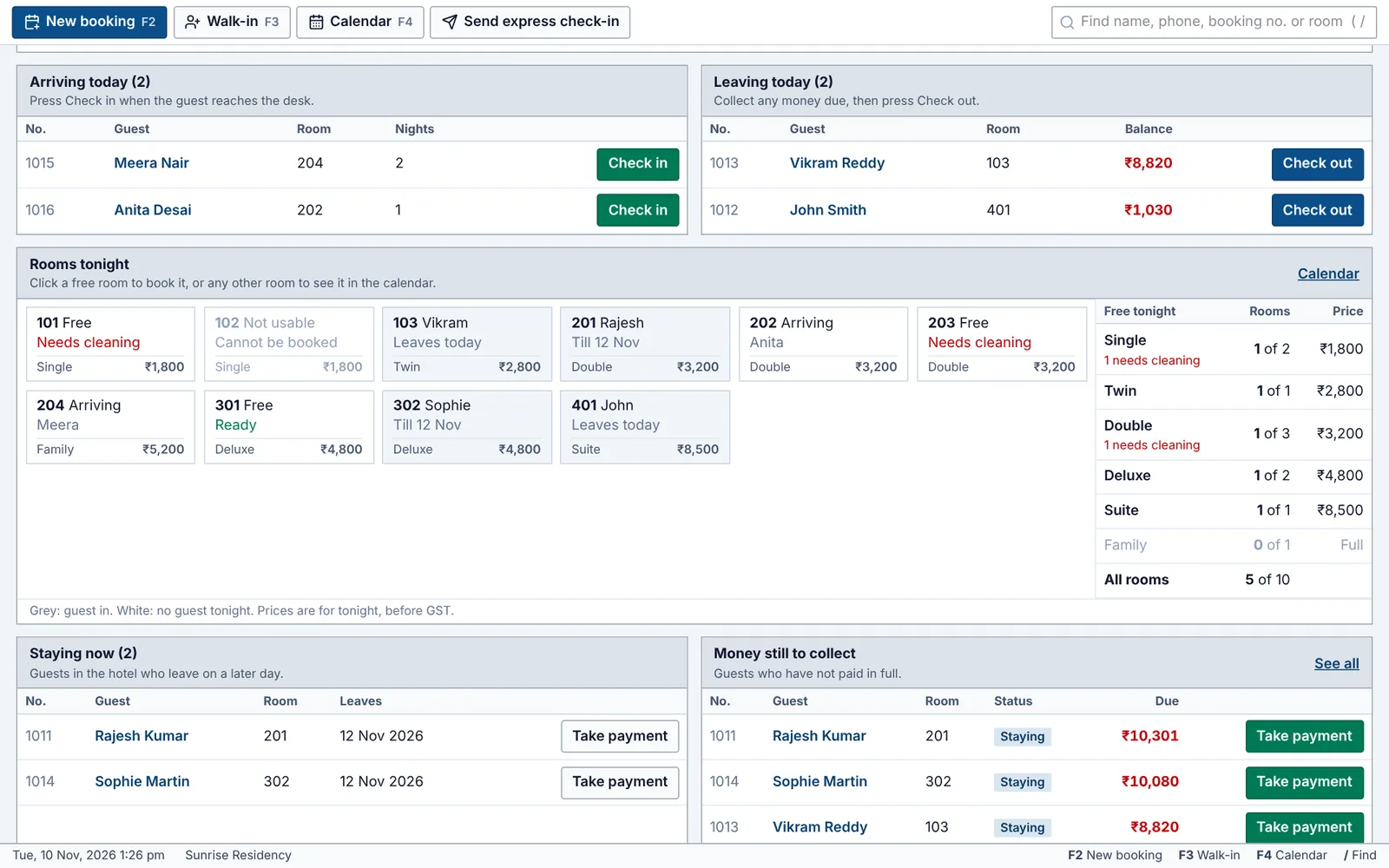
The Dashboard lists who is arriving and departing, with clear Check in and Check out buttons. Below, a box for every room shows who is in tonight, which rooms are free and ready, and which still need cleaning, with today's takings at the top.
- Arrivals and departures, one tap each
- Every room at a glance
- Takings received and balances still due
New reservation
Confirm a reservation before the call ends
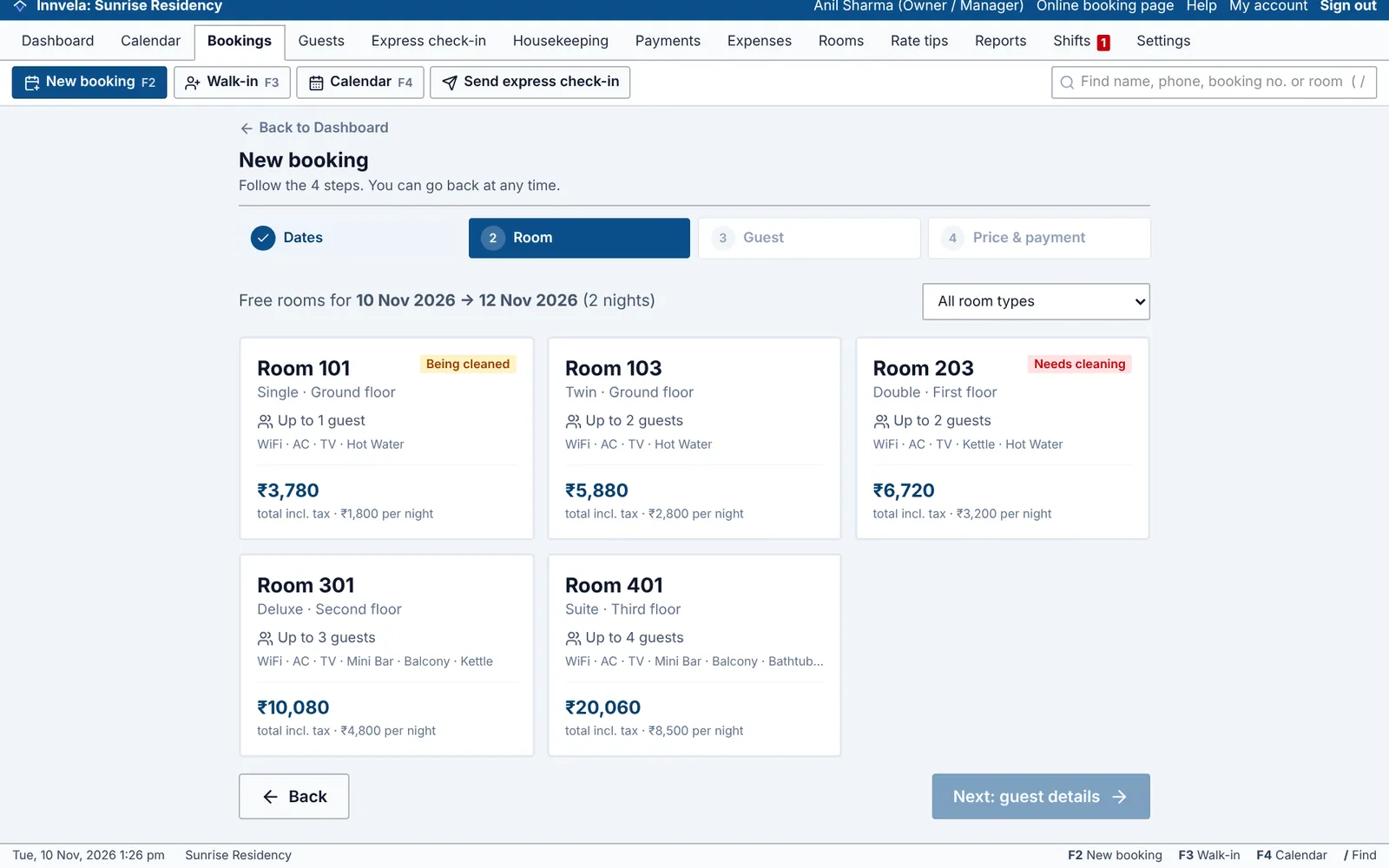
Four quick steps: dates, an available room, the guest's details and the advance. Every available room shows its full price, so you can quote with confidence.
- Quick picks for 1, 2, 3 or 7 nights
- Returning guests recognised by phone number
- Confirmation sent on WhatsApp in one tap
Room calendar
Every room, every night, at a glance
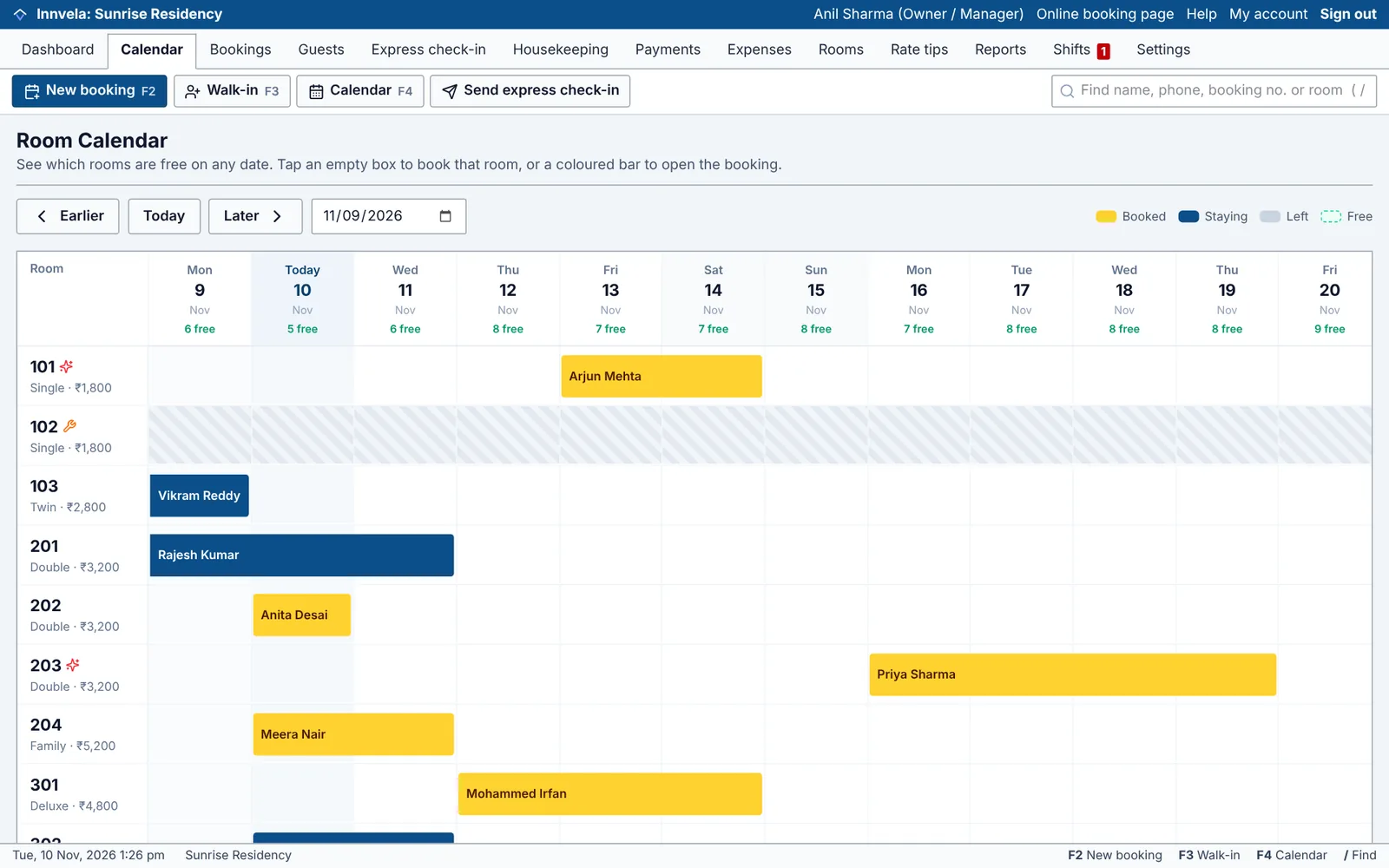
Each room is a row and each day a column. Coloured bars show upcoming, in-house and departed guests. Tap any open night to reserve that room.
- Availability for every day
- Rooms under maintenance blocked off
- Rooms awaiting housekeeping marked
Guest bill
A guest bill that's always right
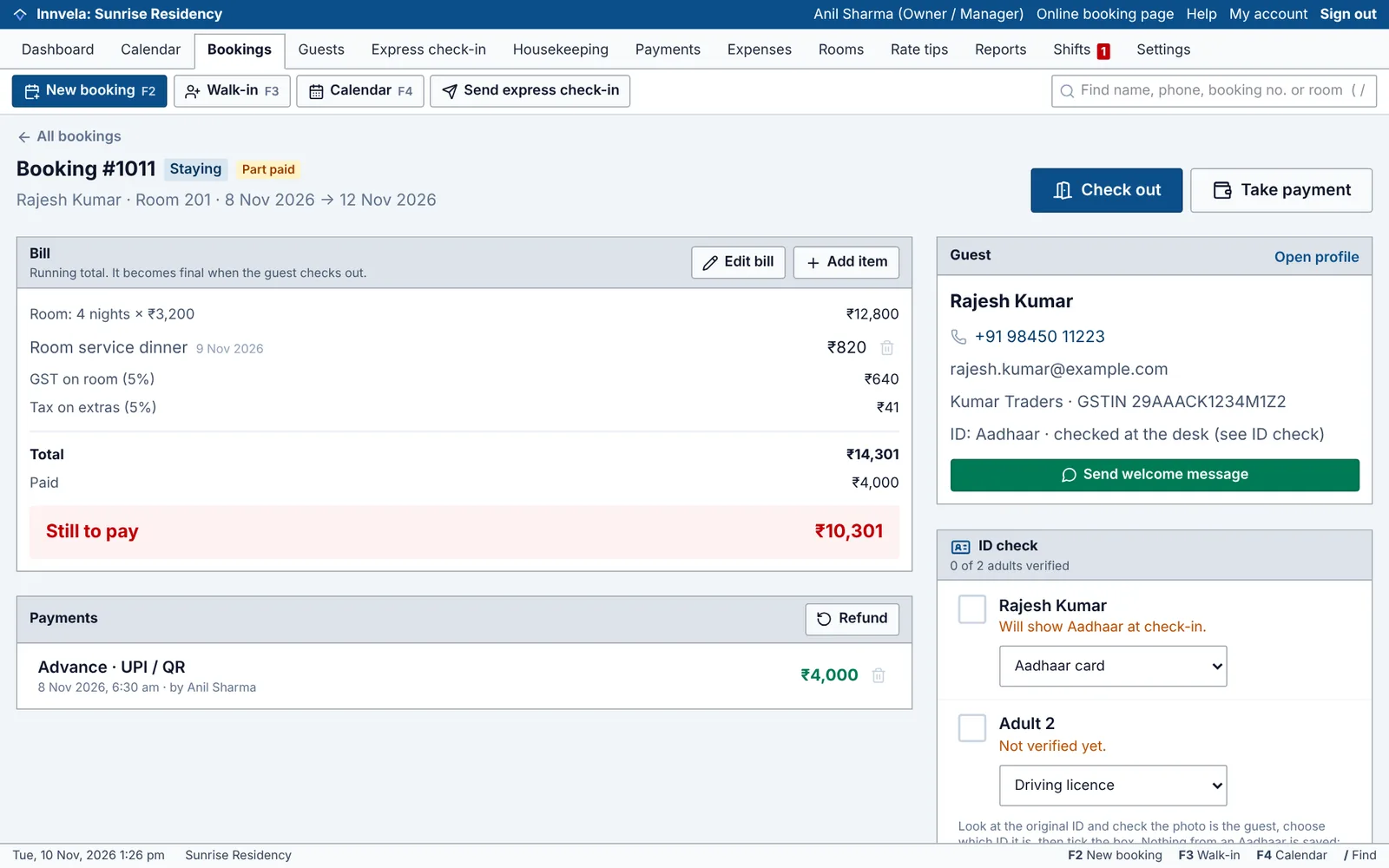
Room nights, weekend and festive rates, discounts, dining and laundry are all added with the correct tax. Take payments as they come, and the balance is always clear.
- Extras added from the front desk
- Advances, part payments and refunds
- Extend the stay or move rooms anytime
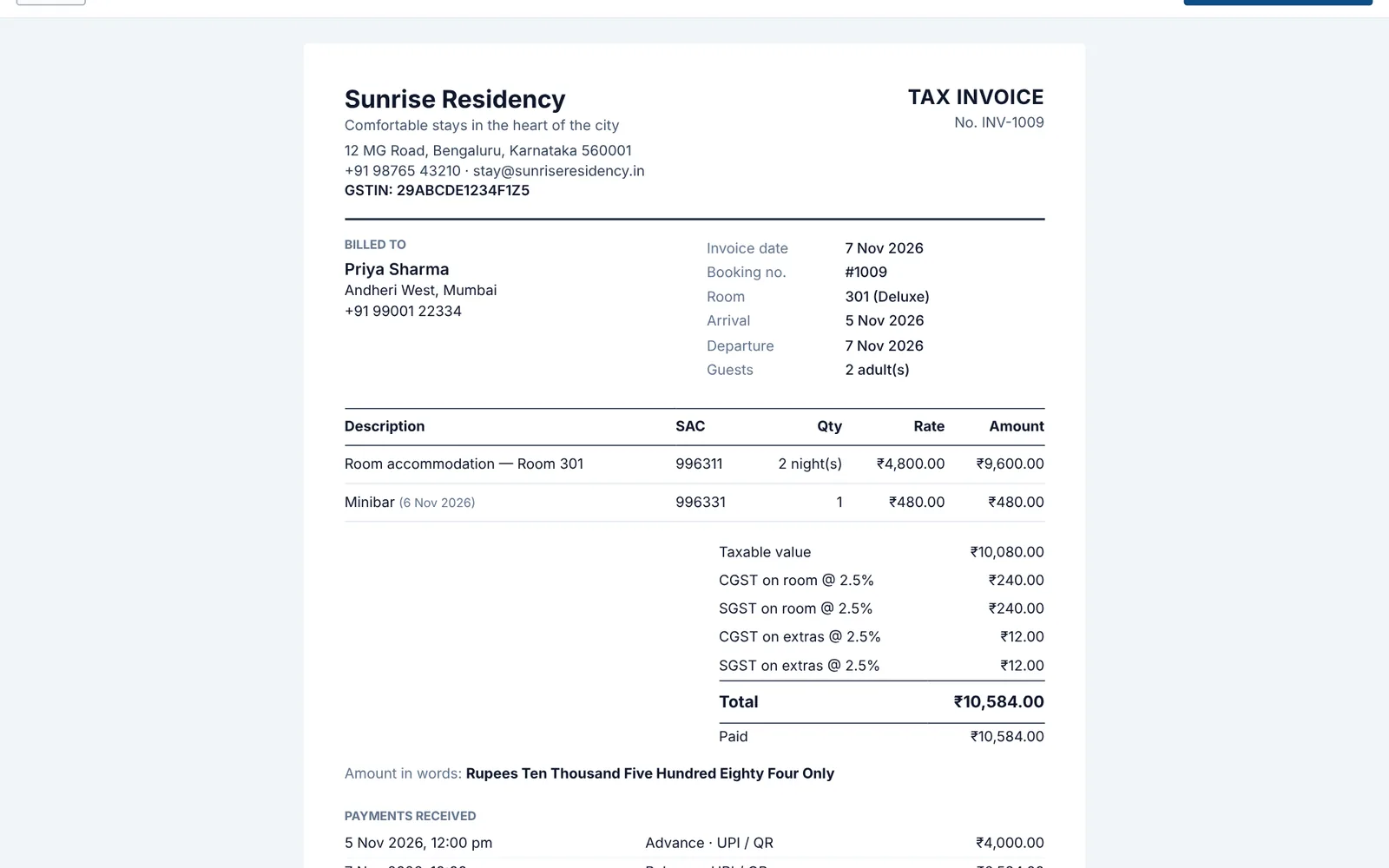
GST invoice
Invoices worthy of your brand
A proper GST tax invoice with your GSTIN and the guest's, SAC codes, CGST and SGST, and the amount in words. The GST slab is chosen automatically from the room rate.
- Print or save as PDF
- Booking confirmation and registration card too
- GST invoice list ready for Excel
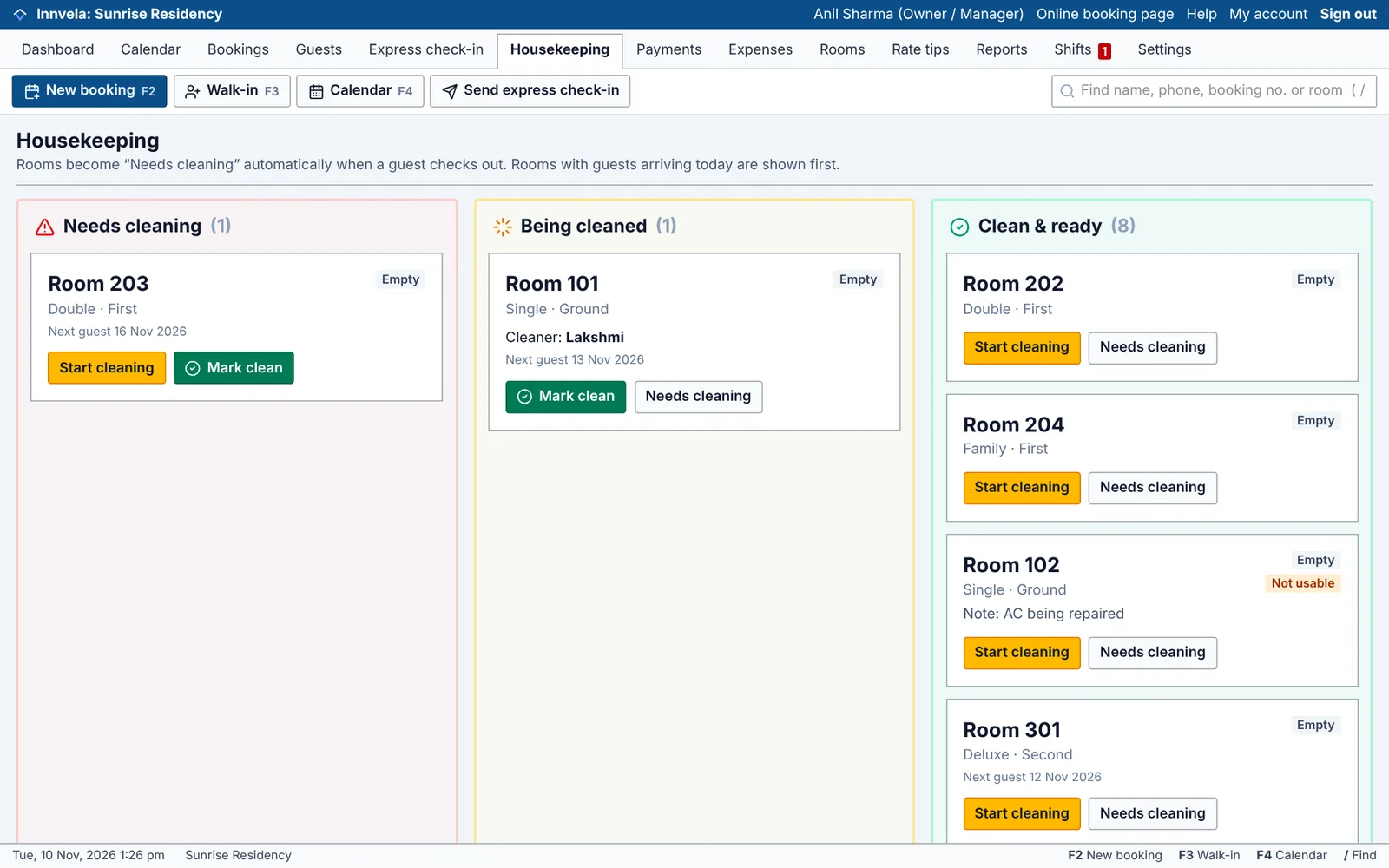
Housekeeping
Every room ready before the guest is
When a guest checks out, the room moves to Needs cleaning, with rooms for today's arrivals at the top. Staff tap Start cleaning and Mark clean from any phone.
- Assign a housekeeper and leave a note
- Today's arrivals prepared first
- Front desk sees the moment a room is ready
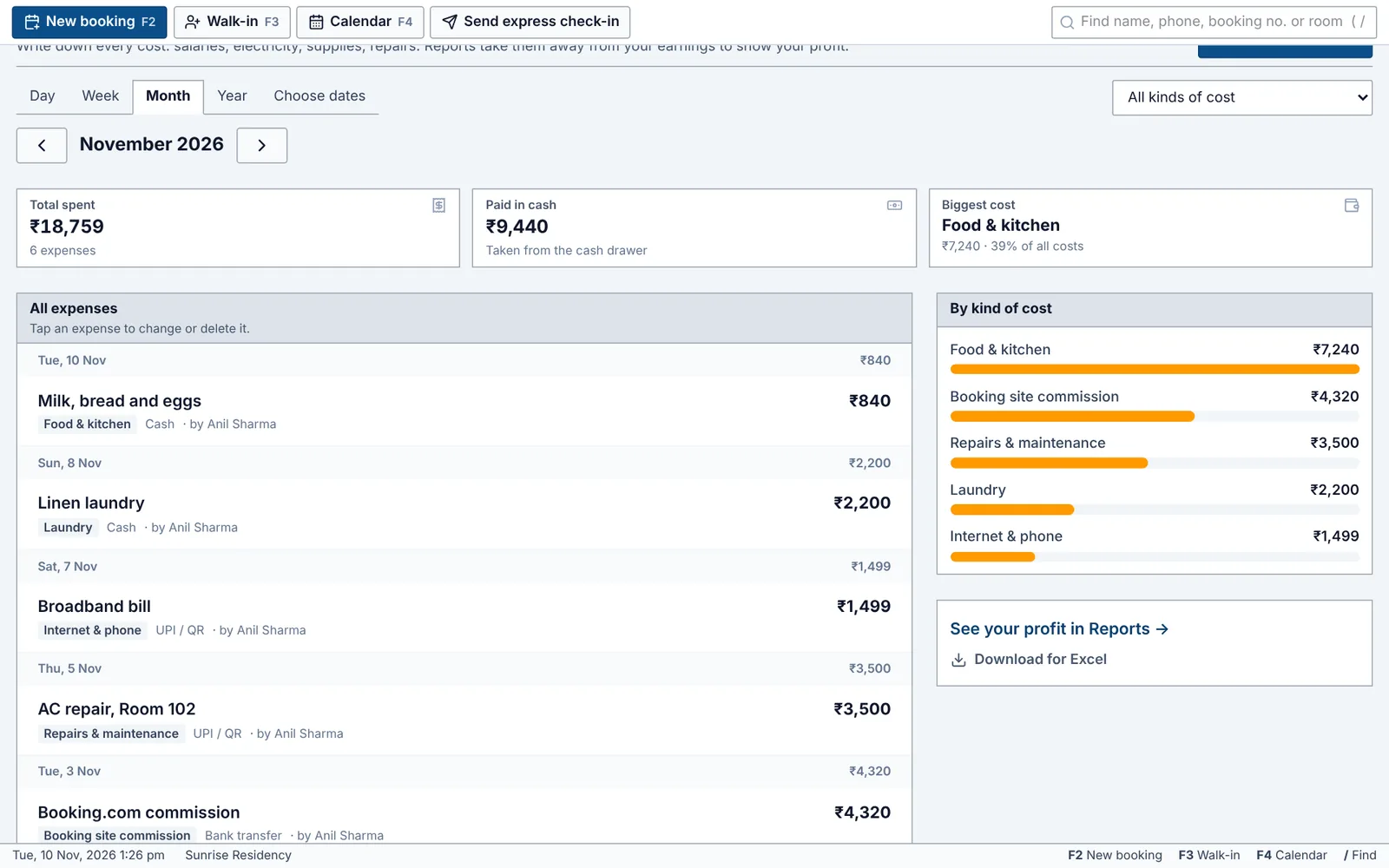
Expenses
Every rupee you spend, in one place
Salaries, electricity, supplies, repairs and commission, written down in seconds. Front desk can add petty cash; the owner sees every cost, by kind.
- Twelve kinds of cost, with notes and bill numbers
- Cash spent is taken off the cash drawer count
- Salaries stay private to the owner
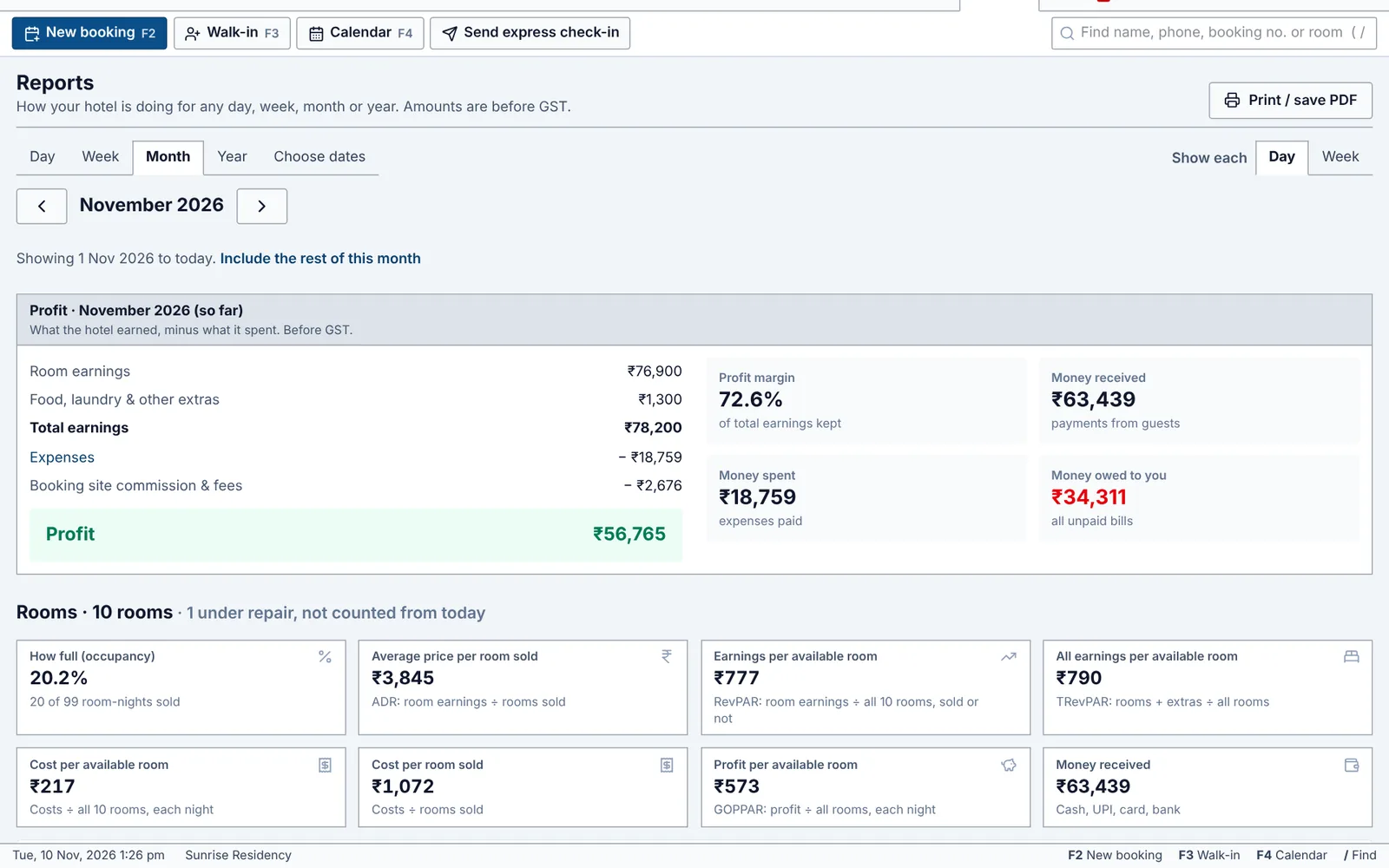
Profit reports
Know your profit, and what every room earns
Pick a day, week, month or year and see earnings minus expenses, how full you were, the average price per room sold, and what each available room earns and costs you (RevPAR). Front desk staff never see these figures.
- Profit after every expense
- RevPAR and cost per available room
- Print, save as PDF or download for Excel
Your booking website
Direct bookings, without the commission
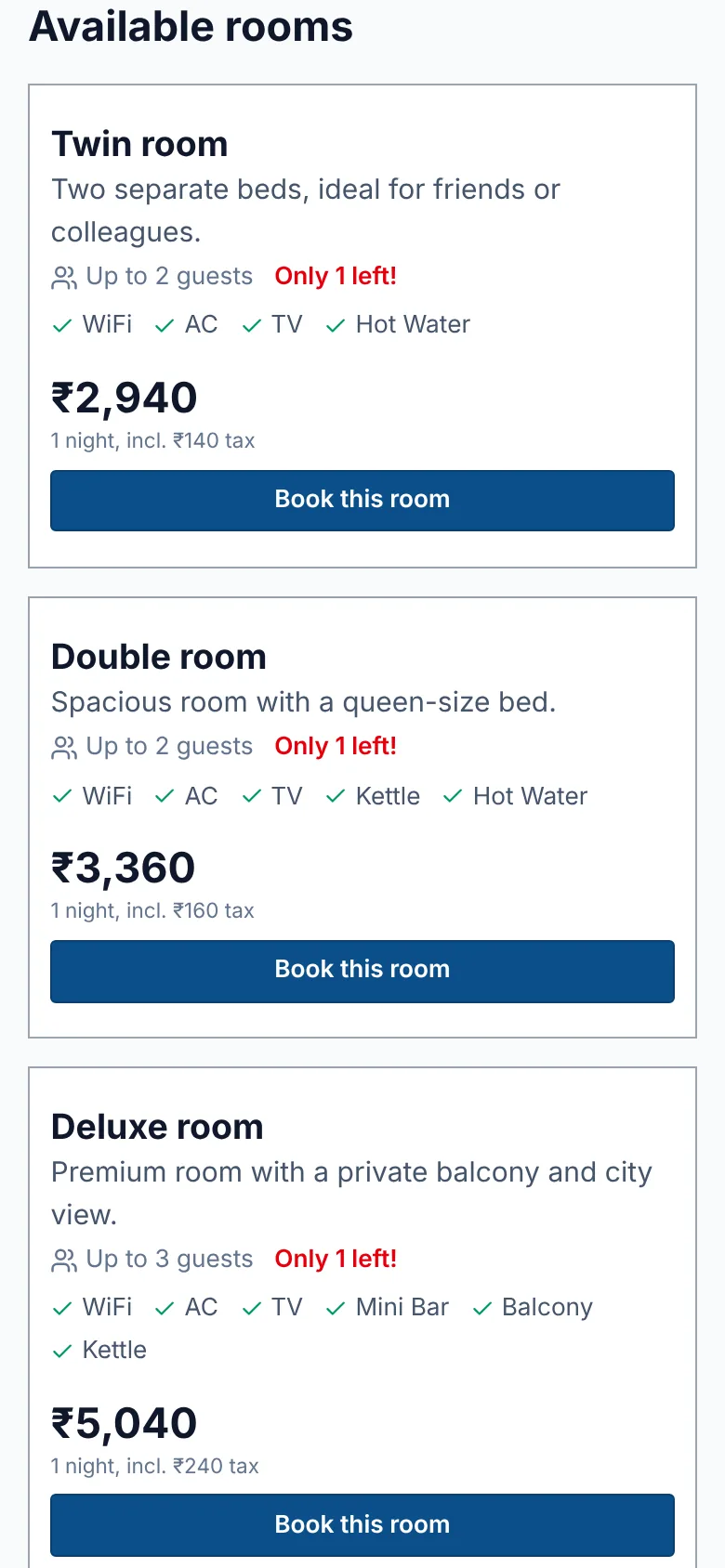
Every property gets its own booking page. Share it on Instagram, WhatsApp, Google Maps and your website. Guests choose their dates, see live rates and book from their phone, and the reservation appears in your app instantly.
- Designed for phones, where most guests book
- Live rates and availability, with your amenities and policies
- Booking reference and confirmation page for the guest
- Call and WhatsApp buttons so guests can reach you directly
Live at your property the same day
- 1
We set up your property
We prepare your account and send your sign-in and booking website link on WhatsApp.
- 2
Add your rooms and rates
A short guided checklist on the first screen. It takes about 10 minutes.
- 3
Welcome your first guests
Invite your team, share your booking link and run the front desk from any device.
Why premium properties switch
The polish your guests expect, with the simplicity your team needs.
New staff confident in one shift
Often needs trainingClear, everyday language
Zero double bookings
Guest details sent ahead on WhatsApp
RarelyShift handover and staff reports
SometimesIncludedPolished GST invoice in one tap
Runs fully on a phone or tablet
SometimesYour own commission-free booking website
Often extra costIncludedRevenue and occupancy from anywhere
Profit after expenses, per room
Often extra costIncluded
Made for hotels in India
GST
Slabs, CGST/SGST, SAC codes
Pathik
Gujarat's police guest register, filled in for you
Form C
Registration card for foreign guests
UPI + WhatsApp
How your guests already pay and stay in touch
Questions owners ask
Do we need special hardware?
No. It runs in the browser on any phone, tablet or computer. Many properties run the front desk on a tablet while owners review the numbers on their phone.
How quickly can our team learn it?
Most front desk staff are confident within one shift. The screens use clear words like “Guest arrived” and “Did not come”, every menu item has a hint, and a step-by-step guide is built in.
How do we stay in control of staff?
Each team member has their own sign-in. Front desk staff can't see reports, change rates or delete payments, and every booking, payment and change is recorded with their name.
How is guest data protected?
Each property's data is kept completely separate. No ID numbers, copies or photos are stored, and nothing from an Aadhaar is saved: staff look at the original ID and tick which one they checked.
Does it handle GST?
Yes. It picks the GST slab from the room rate automatically (you can change the slabs, use one flat rate, or change it for a single booking), adds tax to extras, and prints tax invoices with CGST, SGST and SAC codes.
Can I see my profit?
Yes. Write down expenses as you pay them, and Reports show earnings minus expenses for any day, week, month or year, along with occupancy, the average price per room sold, and what each available room earns and costs you (RevPAR).
Can guests send their details before they arrive?
Yes. Send express check-in on WhatsApp. The guest fills in their address, journey, vehicle and every adult's name on their phone, and says which ID they will show at check-in. You get a pop-up, choose the room and the booking is ready.
We are in Gujarat. Does it help with Pathik?
Yes. A small Chrome helper fills Pathik's Add Guest form from the booking, every adult included. Staff type only the Aadhaar details, press Submit in Pathik, and the Dashboard shows who is still to enter.
Can I see what each shift did?
Yes. Every shift ends with a handover note and a report of check-ins, check-outs and money taken, sent to your WhatsApp. Staff shifts shows attendance and hours per person, with a staff report for Excel.
What about international guests?
Print a guest registration card with a Form C box to fill in by hand. Passport and visa numbers are not stored in the software, so they stay with your hotel.
Does it connect to Booking.com, MakeMyTrip or Airbnb?
Yes. Airbnb, Booking.com and Agoda can be joined for free with a calendar link per room, so a night sold on one side is closed on the other. The full connection also covers MakeMyTrip and Goibibo: your free rooms and prices go to every site by themselves, and their bookings come into your calendar within moments. Booking-site payouts tracks the commission, TCS and TDS each site takes.
Can guests pay online?
Yes. Send a payment link on WhatsApp for the full bill or an advance. Guests pay by UPI straight to your own account (QR code, no charges), or by UPI, card or net banking through your own Razorpay account, which marks the booking as paid by itself. Bills with money still due print a UPI QR code too.
Can we book several rooms for one family or group?
Yes. Tap every room in one booking: same guest and dates, the same special price if you agree one, and one advance shared over the rooms. Each room keeps its own bill and GST invoice, and the group has one page, one payment button and a group bill.
Does it work with Tally?
Yes. Reports make two files for TallyPrime: the ledgers, then the period's GST invoices as Sales vouchers and every payment and refund as Receipt and Payment vouchers, with or without your expenses. Your accountant imports them in two steps, with your own ledger names.
Do we need internet?
Yes, any standard mobile data or WiFi connection is enough.
What does it cost?
A monthly fee per property, with no commission on your bookings. Message us for a quote.
Give your front desk the polish your guests expect
Message us for a private demo. We'll set up your property, add your rooms with you and send your sign-in the same day.
Already using Innvela? Sign in